Post three photos of your completed bag (built), and post the flat color bag pattern to your blog. Answer these questions about your ideas and work....
• How did you use color, value, shapes, symbols, visual textures, or other visual effects to make the bag respond to the logo's meaning?
• What are the visual surprises in the bag to keep the viewer looking at it?
• What was your best discovery in creating the bag project?
Thursday, November 8, 2012

Sunday, October 14, 2012
For Monday, October 15th! I'm out of school!!
Hello guys,
Sorry to be out..... I may be out this whole block too (ug).
We will start designing your own logos Tuesday, when I get back.... Until then you have several things to complete:
• Print your full size Type poster..... 13 X19
• Gather the logo samples
• Recreate 4 of the logos with illustrator.
If you've done all that, try this idea......


Sorry to be out..... I may be out this whole block too (ug).
We will start designing your own logos Tuesday, when I get back.... Until then you have several things to complete:
• Print your full size Type poster..... 13 X19
• Gather the logo samples
• Recreate 4 of the logos with illustrator.
If you've done all that, try this idea......

Here are some samples of these "town logos" they use "kanji" characters in their design.... It's interesting that they are Chinese characters used in Japanese writing...
read up on it.... @ http://en.wikipedia.org/wiki/Kanji
Here are links to see more of the logos listed here-


Thursday, October 11, 2012
Work for Thursday, October 11th.
Sorry that I'm missing class today- here is an interesting project for you....
We are going to explore LOGO DESIGN, so you need some background info on what a logo is...
Follow these directions to gather examples of good logo designs to inspire you when creating your own logo.

Here are those sites as links.....
http://goodlogo.com
http://studio.adobe.com/explore/gallery/tolleson/main.html
http://www.howdesign.com/design-creativity/top-10-sites-for-designers/top-10-websites-for-designers-october-2012/
http://www.commarts.com/CA/exhibit/
http://designarchives.aiga.org/#/entries/%2Bcollections%3A%22AIGA%20365%3A%20Design%20Effectiveness%20%282011%29%22/_/grid/relevance/asc/0/48/90
Here's an example of what the gather logos would look like on the page....

We are going to explore LOGO DESIGN, so you need some background info on what a logo is...
Follow these directions to gather examples of good logo designs to inspire you when creating your own logo.

Here are those sites as links.....
http://goodlogo.com
http://studio.adobe.com/explore/gallery/tolleson/main.html
http://www.howdesign.com/design-creativity/top-10-sites-for-designers/top-10-websites-for-designers-october-2012/
http://www.commarts.com/CA/exhibit/
http://designarchives.aiga.org/#/entries/%2Bcollections%3A%22AIGA%20365%3A%20Design%20Effectiveness%20%282011%29%22/_/grid/relevance/asc/0/48/90
Here's an example of what the gather logos would look like on the page....

Thursday, October 4, 2012
Color Halftone Effect!!!
One of my favorite effects! Here's how you do it....
In Illustrator, select a picture or shape..... the shape needs to have a colored fill (black and white won't work well)

Choose the command off the main menu...

Play with the settings for SIZE and angles of the "channels"..... the four channels relate to colors..... the bottom one is "Black"...

Try setting all but one angle to "0" to get a monochrome effect...
Here's one example of what happened to my image.... cooooooool!

Some other examples.....


In Illustrator, select a picture or shape..... the shape needs to have a colored fill (black and white won't work well)

Choose the command off the main menu...

Play with the settings for SIZE and angles of the "channels"..... the four channels relate to colors..... the bottom one is "Black"...

Try setting all but one angle to "0" to get a monochrome effect...
Here's one example of what happened to my image.... cooooooool!

Some other examples.....


Friday, September 28, 2012
TYPE POSTER IDEAS...
Here are some exciting uses of type in posters.... Look how they use the Positive and negative space, how they overlap objects, how they make visual texture....
See more here @ http://www.webdesignerdepot.com/2009/09/30-typography-posters-that-youve-probably-never-seen-before/


Here are some more experimental type designs from this site @ http://www.webdesignerdepot.com/2011/05/mind-blowing-examples-of-experimental-typography/


See more here @ http://www.webdesignerdepot.com/2009/09/30-typography-posters-that-youve-probably-never-seen-before/


Here are some more experimental type designs from this site @ http://www.webdesignerdepot.com/2011/05/mind-blowing-examples-of-experimental-typography/


Wednesday, September 26, 2012
Posting Your Work....
When posting your design work to the blog, briefly answer these questions about the work.....
5 Squares designs- for each design, explain what the squares are doing, and how you used visual clues to help us understand it.....
Mention any of these topics in your answer-
5 Squares designs- for each design, explain what the squares are doing, and how you used visual clues to help us understand it.....
Mention any of these topics in your answer-
• the squares location in the design space
• their orientation (diagonal, horizontal, etc.)
• how close together they are
Book designs- Describe what the focal point of each design was, and describe what is the best part of your design....
Tuesday, September 25, 2012
Typography Studies Checklist...
Here is a checklist of ways to modify letters to make them LOOK like what they MEAN...


Wednesday, September 19, 2012
Start your Blog!
Follow this link to directions for creating your blog!
Remember the blog is for CLASS USE ONLY.....
Got to this link @ http://wawacdesign.blogspot.com/2012/03/lets-blog.html
Remember the blog is for CLASS USE ONLY.....
Got to this link @ http://wawacdesign.blogspot.com/2012/03/lets-blog.html
Thursday, September 6, 2012
Good Design Checklist!
Use this as a guide in creating your pages to the "four designs book"...

The Book includes these designs, one per page:
Page 1 is LINES only.... use the "stroke" settings in Illustrator
Page 2 is SHAPES and VALUES only, use the "fill" settings
Page 3 is pattern fills, use the swatches controls to make your own!!
Page 4 uses Letters and numbers, use "create outlines" to turn them into shapes....

The Book includes these designs, one per page:
Page 1 is LINES only.... use the "stroke" settings in Illustrator
Page 2 is SHAPES and VALUES only, use the "fill" settings
Page 3 is pattern fills, use the swatches controls to make your own!!
Page 4 uses Letters and numbers, use "create outlines" to turn them into shapes....
Thursday, August 30, 2012
Some Design Inspiration!!!
Here are some designer's websites and examples of their work to get you goin'
JOSHUA DAVIS is a web designer, who uses Illustrator to create shapes from observation. He wrote code that plots out patterns using his shapes- he then chooses results he likes and develops them into his art.
Very smart, creative guy.
See more here @ http://www.joshuadavis.com/
Samples of his work....


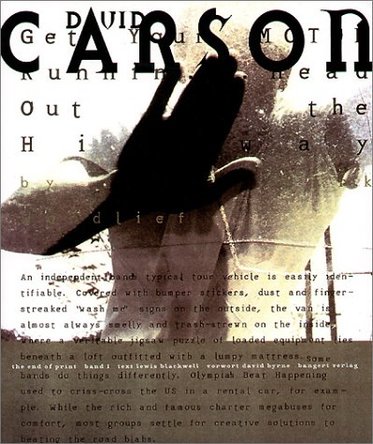
David Carson, best known for revolutionizing graphic design and the use of TYPE in design. Look how he works the negative space!!!
See more of his work here @ http://www.davidcarsondesign.com/


JOSHUA DAVIS is a web designer, who uses Illustrator to create shapes from observation. He wrote code that plots out patterns using his shapes- he then chooses results he likes and develops them into his art.
Very smart, creative guy.
See more here @ http://www.joshuadavis.com/
Samples of his work....


David Carson, best known for revolutionizing graphic design and the use of TYPE in design. Look how he works the negative space!!!
See more of his work here @ http://www.davidcarsondesign.com/


Subscribe to:
Posts (Atom)